
API endpoint update
New integrations should use . Existing URLs remain supported.
API quickstart
Send an image to Animal Detect and receive bounding boxes, labels, and result metadata from your own application.
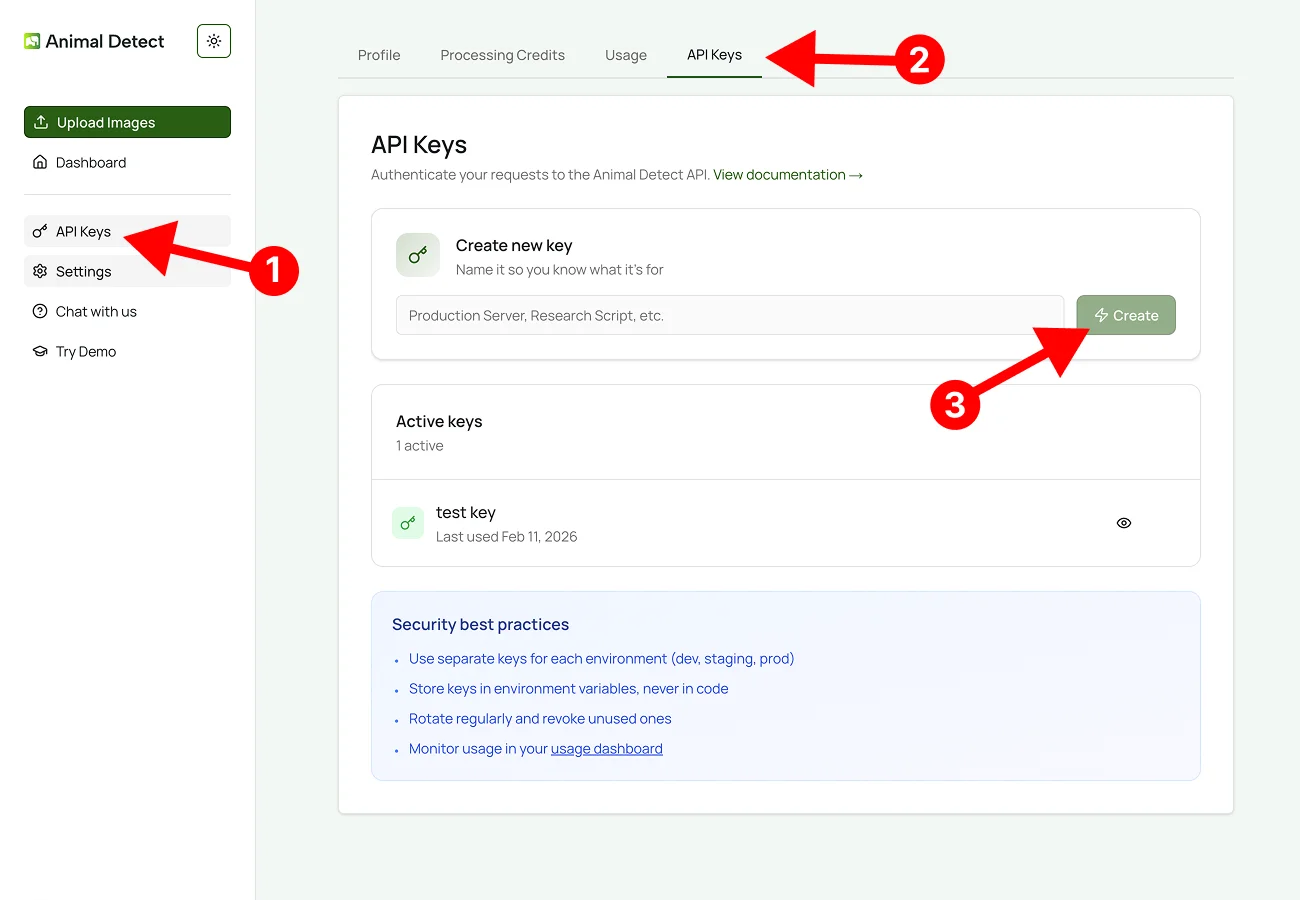
1. Generate an API key
Open the Developer page in your Animal Detect dashboard. Generate a key, copy it once, and store it as an environment variable. Do not expose API keys in frontend code or public repositories.
2. Authenticate requests
Send your key in the Authorization header on every authenticated request:
Authorization: Bearer YOUR_API_KEY3. Send your first API request
Send one image to /v1/detect and inspect the returned annotations. The response includes detected objects, bounding boxes, labels, and processing details.
cURL
curl -X POST "https://api.animaldetect.com/v1/detect" \
  -H "Authorization: Bearer YOUR_API_KEY" \
  -F "image=@/path/to/image.jpg" \
  -F "threshold=0.2" \
  -F "country=USA"
Use the interactive playground to test endpoints before wiring them into your application.